
Blame
|
1 | # Webhook |
||||||
| 2 | ||||||||
|
3 | To add a webhook to LubeLogger, you just have to add the WebHook URL in the Server Settings Configurator |
||||||
|
4 | |||||||
| 5 | Example payload: |
|||||||
| 6 | ||||||||
|
7 | 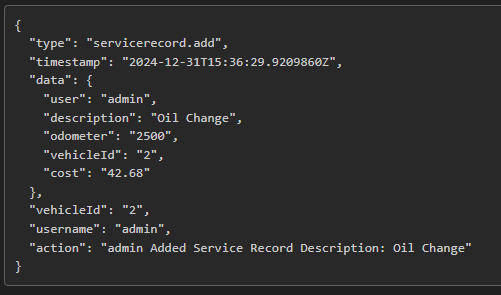 |
||||||
|
8 | |||||||
| 9 | Triggers: |
|||||||
| 10 | ||||||||
| 11 | - Vehicle - Create/Edit/Delete |
|||||||
| 12 | - Service Record/Repair/Upgrade - Create/Edit/Delete/Move/Adjust Odometer/Duplicate |
|||||||
|
13 | - Odometer - Create/Edit/Delete/Adjust Odometer/Duplicate |
||||||
|
14 | - Fuel/Tax/Supply/Notes/Reminders - Create/Edit/Delete/Duplicate |
||||||
| 15 | ||||||||
| 16 | Adding records via the API will also trigger the above webhook. |
|||||||
|
17 | |||||||
| 18 | ## Discord Webhook |
|||||||
| 19 | ||||||||
|
20 | LubeLogger supports using Discord Chatrooms as a webhook as of 1.4.2, to use Discord as a webhook, change the `https://` in the beginning of the webhook URL to `discord://` |
||||||
|
21 | |||||||
|
22 | `https://discord.com/api/webhooks/...` |
||||||
| 23 | ||||||||
| 24 | will turn into |
|||||||
| 25 | ||||||||
| 26 | `discord://discord.com/api/webhooks/...` |
|||||||
|
27 | |||||||
| 28 | Example Discord Webhook Payload: |
|||||||
| 29 | ||||||||
| 30 | 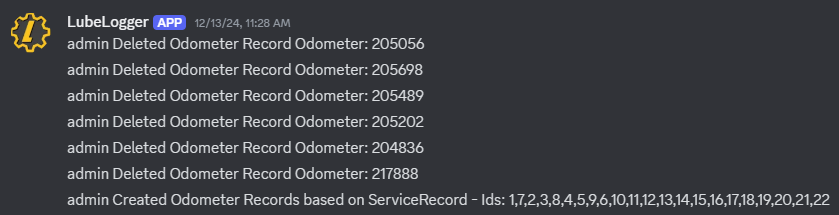 |
|||||||
|
31 | |||||||
| 32 | # WebSocket |
|||||||
| 33 | ||||||||
| 34 | Web sockets allows multiple external applications to subscribe to events, unlike webhooks which only allows for one subscriber at a time. Web Sockets also enables real-time sync within LubeLogger which is the ideal approach for [[Kiosk|Advanced/Kiosk]] mode. |
|||||||
| 35 | ||||||||
| 36 | Web socket can be enabled in the [[Server Settings Configurator|Installation/Server Settings]] |
|||||||
| 37 | ||||||||
| 38 |  |
|||||||
| 39 | ||||||||
| 40 | ## Testing WebSocket Connection |
|||||||
| 41 | ||||||||
| 42 | Web sockets are implemented through SignalR hubs, which provides fallbacks such as SSE and long-polling if operating under unsupported environments. For this example, we will assume that web sockets are enabled and supported. |
|||||||
| 43 | ||||||||
| 44 | In PostMan(or your preferred RestApi tester), select WebSocket as the connection type: |
|||||||
| 45 | ||||||||
| 46 | 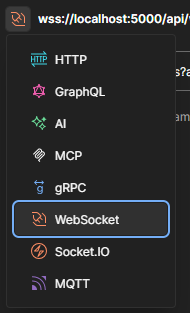 |
|||||||
| 47 | ||||||||
| 48 | If authentication is enabled, you will need to generate an api key(viewer permission) and append it. If your LubeLogger instance is served over a https connection, use `wss://` otherwise use `ws://` |
|||||||
| 49 | ||||||||
| 50 | Example URL: |
|||||||
| 51 | ||||||||
| 52 | ``` |
|||||||
| 53 | wss://your/lubelogger/domain/api/ws?apiKey=<apiKey> |
|||||||
| 54 | ``` |
|||||||
| 55 | ||||||||
| 56 | Click connect and it should succeed |
|||||||
| 57 | ||||||||
| 58 |  |
|||||||
| 59 | ||||||||
| 60 | You will then send a few messages to set the protocol and join either one of these groups: |
|||||||
| 61 | ||||||||
| 62 | - kiosk |
|||||||
| 63 | - vehicleId_{id of the vehicle} |
|||||||
| 64 | ||||||||
|
65 | The `kiosk` group allows you to subscribe to changes across all vehicles in the your garage, where as the vehicleId_{id of the vehicle} group allows you to subscribe to changes only from that vehicle. |
||||||
|
66 | |||||||
| 67 | Because the messages contains the non-printing character `0x1e` (RS), they can be found on this [gist](https://gist.github.com/hargata/d9dc0ce127e6fb24f877886a7e395c2e) instead of being in this wiki. |
|||||||
| 68 | ||||||||
| 69 | This message sets the protocol |
|||||||
| 70 | ||||||||
| 71 |  |
|||||||
| 72 | ||||||||
|
73 | After sending this, you will start receiving heartbeats from the websocket |
||||||
| 74 | ||||||||
| 75 | 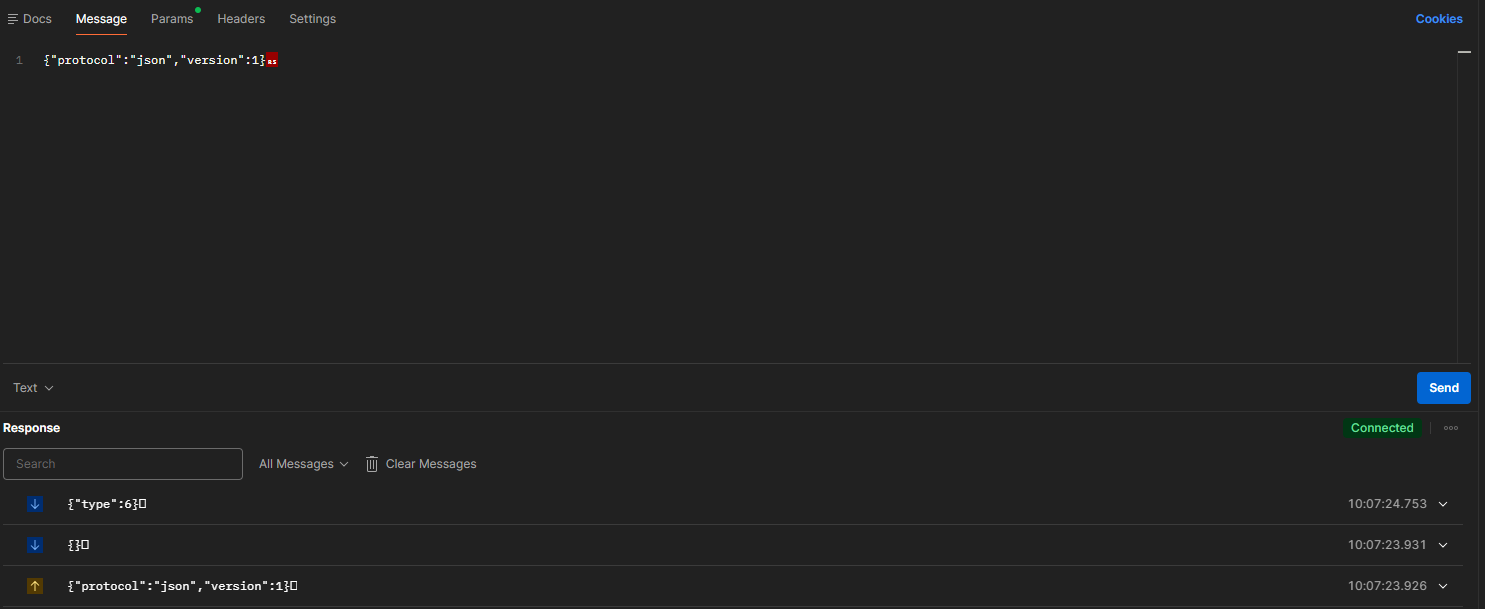 |
|||||||
| 76 | ||||||||
|
77 | This message joins the kiosk group |
||||||
| 78 | ||||||||
| 79 |  |
|||||||
| 80 | ||||||||
|
81 | After sending this, you will start receiving events for all vehicles in the garage. |
||||||
| 82 | ||||||||
| 83 |  |
|||||||
| 84 | ||||||||
|
85 | This message joins the group for vehicleId 1 |
||||||
| 86 | ||||||||
| 87 |  |
|||||||
| 88 | ||||||||
| 89 | If you're already joining the kiosk group, joining the vehicleId groups is redundant. |
|||||||
| 90 | ||||||||
| 91 | ## Notes on WebSocket Security |
|||||||
| 92 | ||||||||
|
93 | Unlike webhooks which publishes all events for all vehicles to a centralized endpoint, users will only receive events based on the vehicles they have access to. An API Key generated by a root user will receive events from all vehicles in the system. |
||||||
|
94 | |||||||
| 95 | ## Notes on Reverse proxy |
|||||||
| 96 | ||||||||
| 97 | If you are running LubeLogger behind a reverse proxy, you will need to configure your proxy to upgrade and forward the websocket connection correctly. |
|||||||
| 98 | ||||||||
| 99 | Sample NGINX Configuration: |
|||||||
| 100 | ||||||||
| 101 | ``` |
|||||||
| 102 | location /api/ws { |
|||||||
| 103 | proxy_pass http://127.0.0.1:8080; |
|||||||
| 104 | proxy_http version 1.1; |
|||||||
| 105 | proxy_set_header Upgrade $http_upgrade; |
|||||||
| 106 | proxy_set_header Connection "upgrade"; |
|||||||
| 107 | proxy_set_header Host $host; |
|||||||
| 108 | proxy_cache_bypass $http_upgrade; |
|||||||
| 109 | } |
|||||||
| 110 | ``` |
|||||||