
Blame
|
1 | # API |
||||||
| 2 | ||||||||
|
3 | LubeLogger provides API endpoints to retrieve and add records, full documentation of these endpoints can be found at `/api`. |
||||||
|
4 | |||||||
| 5 | ## Authentication |
|||||||
|
6 | The following authentication methods are supported: |
||||||
|
7 | |||||||
|
8 | - Basic Auth(RFC2617) |
||||||
| 9 | - API Keys |
|||||||
|
10 | |||||||
|
11 | ### Basic Auth |
||||||
| 12 | Basic Auth is implemented based on RFC2617, which stipulates that the "token" is passed in as a Base64-encoded string comprising of a username and password separated by a colon(":"). Because of this, neither the username nor password can contain a colon(":") character. The "token" is passed in via either through the request headers or in-line authorization for clients that support it. |
|||||||
|
13 | |||||||
|
14 | Examples: |
||||||
| 15 | - Request Headers: `Authorization: Basic dGVzdDoxMjM0` |
|||||||
| 16 | - In-line authorization: `https://test:1234@demo.lubelogger.com/api/calendar` |
|||||||
|
17 | |||||||
|
18 | Note: Single Sign On(SSO) users should not use Basic Auth for API integrations and should instead rely on API Keys. |
||||||
| 19 | ||||||||
| 20 | ### API Keys |
|||||||
| 21 | API keys are randomly-generated tokens that allow integrations to access and modify data on behalf of the user, they are equivalent to user credentials thus it is important to store them safely and only be provided to applications you trust. Unlike Basic Auth, API keys can only be used to access `/api` endpoints. |
|||||||
| 22 | ||||||||
| 23 | API Keys can be scoped to the following roles: |
|||||||
| 24 | - Viewer(view only) |
|||||||
| 25 | - Editor(view, add, and edit) |
|||||||
| 26 | - Manager(view, add, edit, and delete) |
|||||||
| 27 | ||||||||
| 28 | #### Generating API Keys |
|||||||
| 29 | ||||||||
| 30 | 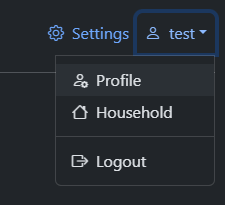 |
|||||||
| 31 | ||||||||
| 32 | 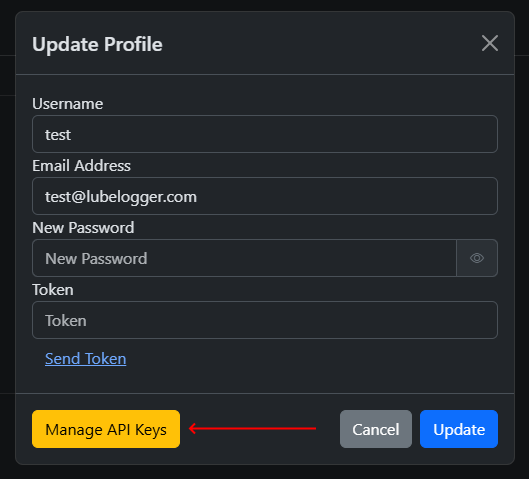 |
|||||||
| 33 | ||||||||
| 34 | 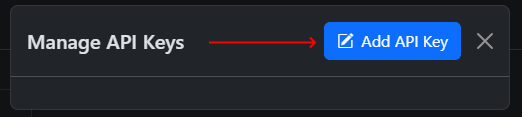 |
|||||||
| 35 | ||||||||
| 36 | 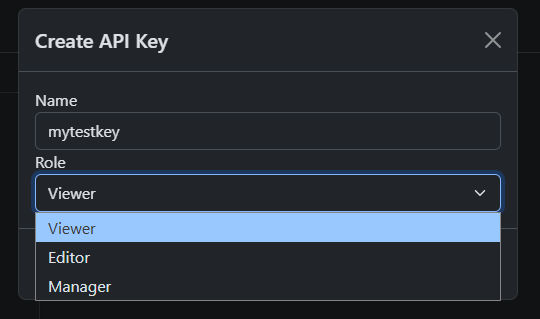 |
|||||||
| 37 | ||||||||
| 38 | The API key will be generated and displayed in a popup, note that this is the only time you will see this API key, so make sure to copy it before closing the popup. |
|||||||
| 39 | ||||||||
| 40 | 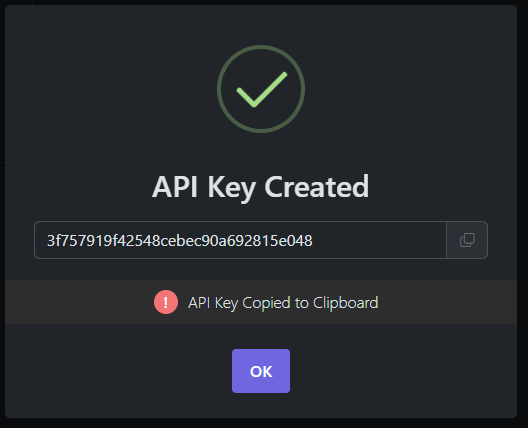 |
|||||||
| 41 | ||||||||
| 42 | #### Using API Keys |
|||||||
| 43 | ||||||||
| 44 | API keys can be passed in via request headers or appended to the URL(in-line authorization). |
|||||||
| 45 | ||||||||
| 46 | Examples: |
|||||||
| 47 | - Request Headers: `x-api-key: 3f757919f42548cebec90a692815e048` |
|||||||
| 48 | - In-line authorization: `https://demo.lubelogger.com/api/vehicles?apiKey=3f757919f42548cebec90a692815e048` |
|||||||
|
49 | |||||||
|
50 | ## POST/PUT Encoding |
||||||
| 51 | As of 1.4.2, LubeLogger supports bodies in both form-data, x-www-form-urlencoded, and JSON format. |
|||||||
| 52 | ||||||||
| 53 | Note that form-data and x-www-form-urlencoded will always convert any data into strings even if you are passing in a number. Post bodies in JSON if you wish to pass in numbers and integers. |
|||||||
| 54 | ||||||||
| 55 | ## Locale-Invariant Formatting |
|||||||
| 56 | By default, LubeLogger will return all data as strings for GET methods and it is locale-sensitive: |
|||||||
| 57 | ||||||||
| 58 | 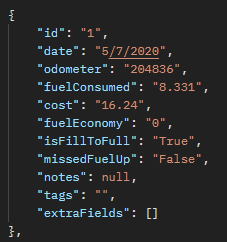 |
|||||||
| 59 | ||||||||
| 60 | Note the date and decimal formatting. |
|||||||
| 61 | ||||||||
| 62 | If you wish for locale invariant and type-rich formatting(numbers are returned as numbers instead of string), you can either inject the following environment variable: |
|||||||
| 63 | ||||||||
| 64 | `LUBELOGGER_INVARIANT_API=true` |
|||||||
| 65 | ||||||||
| 66 | Or add the following Header Key in your API request: |
|||||||
| 67 | ||||||||
| 68 | `culture-invariant` |
|||||||
| 69 | ||||||||
| 70 | No values are needed, the presence of the key is sufficient for LubeLogger to format the API response: |
|||||||
| 71 | ||||||||
| 72 | 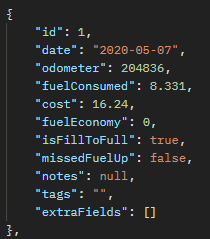 |
|||||||
| 73 | ||||||||
|
74 | ## GET Parameters |
||||||
| 75 | As of 1.4.8, you can now pass in additional parameters to filter down results from the following GET API endpoints: |
|||||||
| 76 | ||||||||
| 77 | - Plan |
|||||||
| 78 | - Odometer |
|||||||
| 79 | - Service Record |
|||||||
| 80 | - Repair |
|||||||
| 81 | - Upgrade |
|||||||
| 82 | - Fuel |
|||||||
| 83 | - Tax |
|||||||
| 84 | ||||||||
| 85 | The parameters that you can pass in are: |
|||||||
| 86 | ||||||||
| 87 | ``` |
|||||||
| 88 | Id: Id of the record |
|||||||
| 89 | StartDate: Find records after this date (not inclusive) |
|||||||
| 90 | EndDate: Find records before this date (not inclusive) |
|||||||
| 91 | Tags: Find records that contains these tags(separated by white space, not applicable to Plans) |
|||||||
| 92 | ``` |
|||||||
| 93 | ||||||||
| 94 | 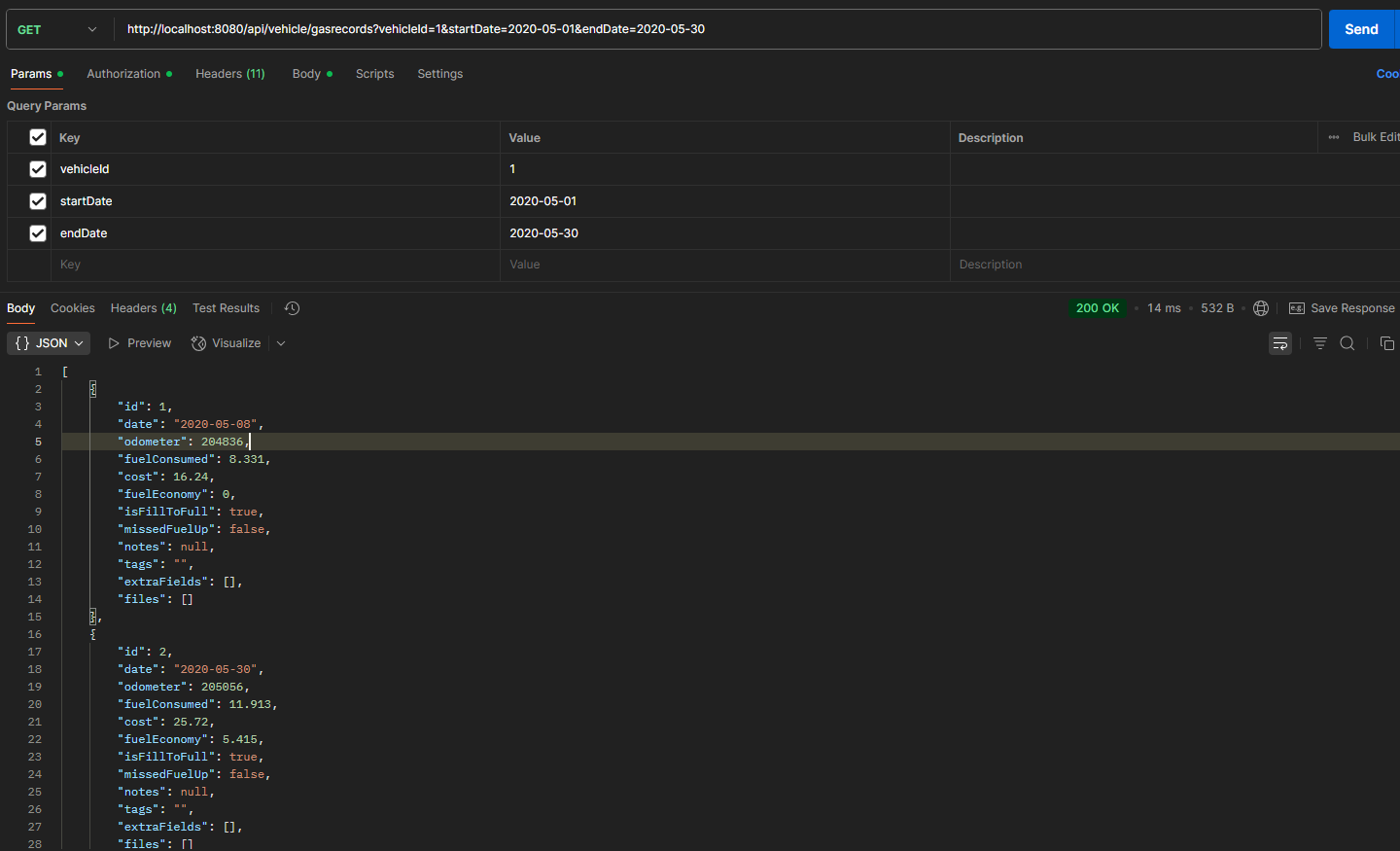 |
|||||||
| 95 | ||||||||
|
96 | ## Cleaning up Temp/Unlinked Files |
||||||
| 97 | The clean up endpoint: `/api/cleanup` will clear up any temp files created by LubeLogger. Adding the `deepClean=true` parameter will also clear out any unlinked attachments(files where the record it is associated with no longer exists). You need to have access to the root user credentials to access this endpoint. |
|||||||
|
98 | |||||||
|
99 | ## Testing |
||||||
|
100 | You can utilize any REST API testing tool to test your use-case. |
||||||
| 101 | ||||||||
|
102 | [Postman Collection](https://github.com/hargata/lubelog_scripts/blob/main/misc/LubeLogger.postman_collection.json) |
||||||
| 103 | ||||||||
|
104 | ## Example Use Cases |
||||||
| 105 | - Send Email Reminders, see [[Reminders|Records/Reminders#reminder-emails]] |
|||||||
| 106 | - Insert Odometer Records, see [[Odometer|Records/Odometer#api-integration]] |
|||||||
|
107 | - Create DB Backups, [Example BASH Script](https://github.com/hargata/lubelog_scripts/blob/main/bash/makebackup.sh) [Example DOS Script](https://github.com/hargata/lubelog_scripts/blob/main/dos/makebackup.bat) |
||||||