LubeLogger provides API endpoints to retrieve and add records, full documentation of these endpoints can be found at `/api`.
## Authentication
-
If authentication is enabled, it implements Basic Auth based on RFC2617, which stipulates that the "token" is passed in as a Base64-encoded string comprising of a username and password separated by a colon(":"). Because of this, neither the username nor password can contain a colon(":") character.
+
The following authentication methods are supported:
-
### In-line URL Authorization
-
In-line authorization is supported as of 1.4.3 as it is necessary for authorization for the calendar endpoint. Use it as so:
Basic Auth is implemented based on RFC2617, which stipulates that the "token" is passed in as a Base64-encoded string comprising of a username and password separated by a colon(":"). Because of this, neither the username nor password can contain a colon(":") character. The "token" is passed in via either through the request headers or in-line authorization for clients that support it.
-
For the calendar endpoint, it will look something like this:
Note: Single Sign On(SSO) users should not use Basic Auth for API integrations and should instead rely on API Keys.
+
+
### API Keys
+
API keys are randomly-generated tokens that allow integrations to access and modify data on behalf of the user, they are equivalent to user credentials thus it is important to store them safely and only be provided to applications you trust. Unlike Basic Auth, API keys can only be used to access `/api` endpoints.
+
+
API Keys can be scoped to the following roles:
+
- Viewer(view only)
+
- Editor(view, add, and edit)
+
- Manager(view, add, edit, and delete)
+
+
#### Generating API Keys
+
+
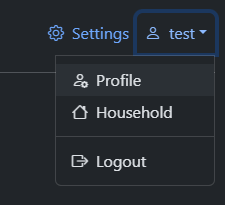
+
+
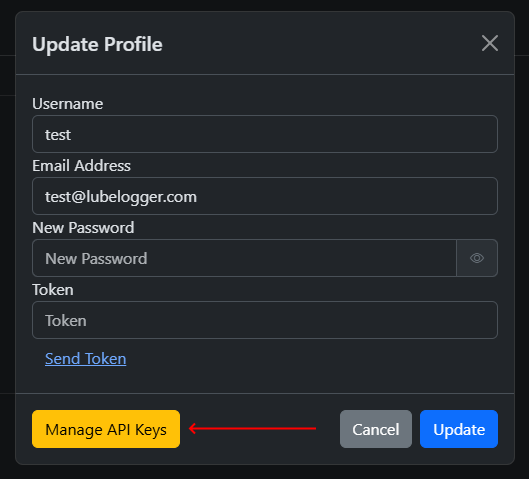
+
+
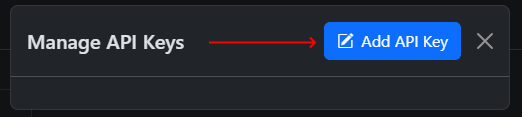
+
+
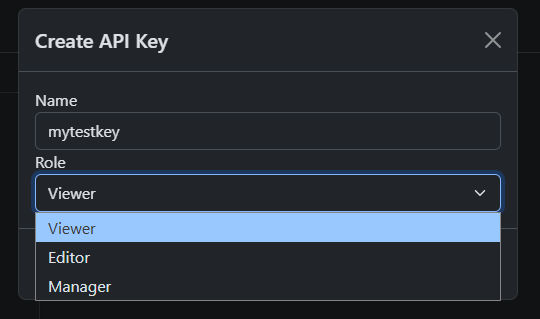
+
+
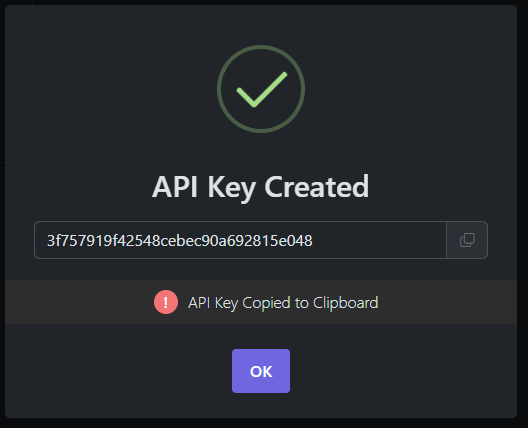
The API key will be generated and displayed in a popup, note that this is the only time you will see this API key, so make sure to copy it before closing the popup.
+
+
+
+
#### Using API Keys
+
+
API keys can be passed in via request headers or appended to the URL(in-line authorization).
