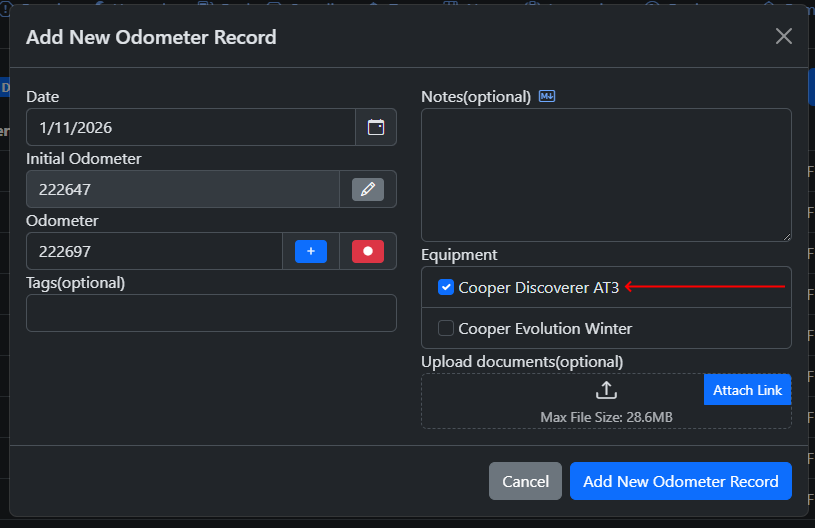
When "Is Equipped" is selected for the equipment, it will be equipped by default when an odometer record is added, either manually or via the auto-insert when adding other records(when auto-insert is enabled) either manually or via the API with the exception of the "Add Odometer Record" endpoint
-
### Note on API
+
The "Distance" column in the Equipment tab displays the total amount of distance based on the odometer records associated where the equipment is equipped.
+
+

+
+
## Attaching Equipment to existing Odometer Records
+
+
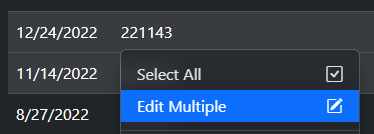
You can either edit the Odometer Records one by one or selecting multiple of them, right click and select "Edit Multiple"
+
+
+
+
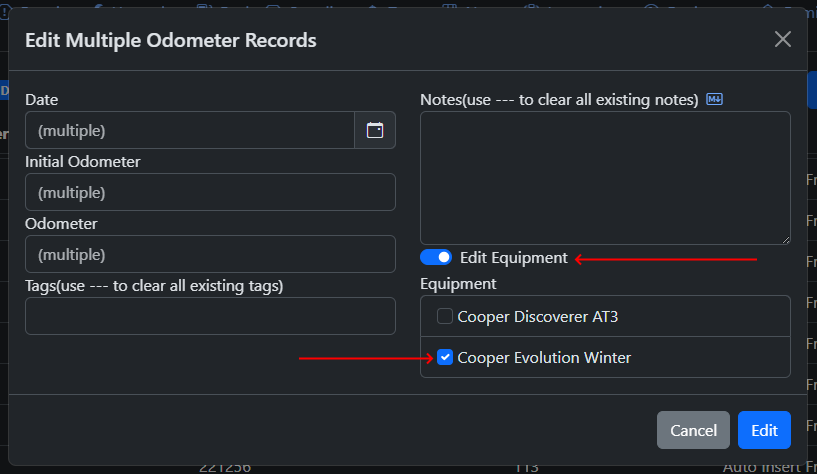
Then enable "Edit Equipment" and then select the equipment
+
+
+
+
Note that "Edit Equipment" will override any equipment that was previously linked to the selected records.
+
+
## Note on API
When Auto-Insert Odometer Records is enabled, calling the following endpoints will automatically insert an odometer record with any equipment marked as "Is Equipped"
@@ 45,19 61,3 @@
```
-
-
The "Distance" column in the Equipment tab displays the total amount of distance based on the odometer records associated where the equipment is equipped.
-
-

-
-
## Attaching Equipment to existing Odometer Records
-
-
You can either edit the Odometer Records one by one or selecting multiple of them, right click and select "Edit Multiple"
-
-

-
-
Then enable "Edit Equipment" and then select the equipment
-
-

-
-
Note that "Edit Equipment" will override any equipment that was previously linked to the selected records.
